# Visão Geral da Reforma Tributária

### Configurações Gerais

##### Contexto e Motivação

<span style="white-space: pre-wrap;">A decisão de </span>**não reutilizar as telas dos impostos atuais**<span style="white-space: pre-wrap;"> foi tomada após análise dos critérios, cenários e incertezas trazidos pela Reforma Tributária.</span>  
<span style="white-space: pre-wrap;">Os tributos </span>**CBS (Contribuição sobre Bens e Serviços)**<span style="white-space: pre-wrap;"> e </span>**IBS (Imposto sobre Bens e Serviços)**<span style="white-space: pre-wrap;"> possuem regras e comportamentos distintos dos tributos vigentes (como PIS, COFINS e ICMS), e os impostos atuais serão descontinuados até </span>**2033**.

<span style="white-space: pre-wrap;">Por esse motivo, optamos por criar </span>**novas telas e cadastros exclusivos**<span style="white-space: pre-wrap;"> para os tributos CBS/IBS, o que proporciona:</span>

- **Separação clara**<span style="white-space: pre-wrap;"> entre os tributos antigos e os novos;</span>
- **Facilidade na implantação e manutenção**<span style="white-space: pre-wrap;"> das regras fiscais;</span>
- **Maior clareza para o suporte e treinamento**, com funcionalidades distintas e independentes.

##### Novo Parâmetro

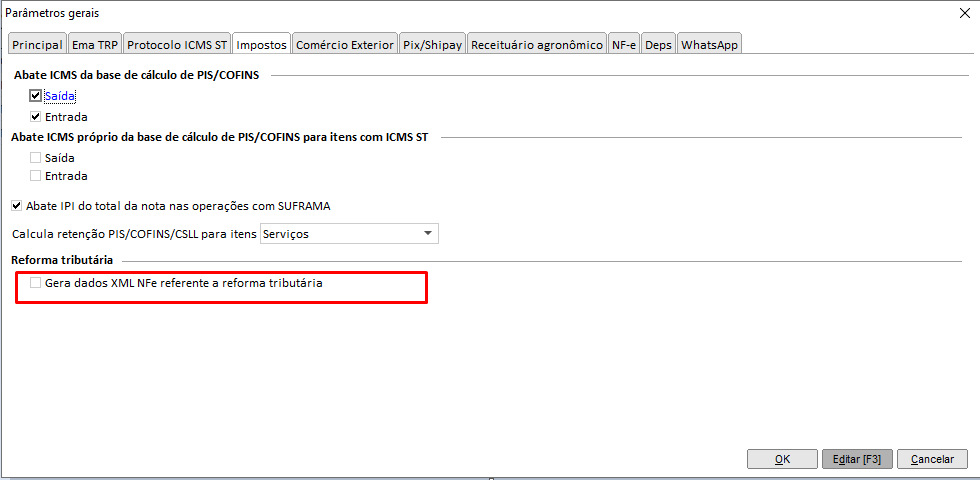
<span style="white-space: pre-wrap;">Para adequação dos sistemas Ema à </span>**Reforma Tributária**<span style="white-space: pre-wrap;">, foi implementado um novo parâmetro nas configurações de </span>**Matriz/Filial**<span style="white-space: pre-wrap;"> do módulo </span>**Ema ERP**.  
<span style="white-space: pre-wrap;">Esse parâmetro permite o </span>**envio dos novos dados XML da NFe**<span style="white-space: pre-wrap;"> conforme os ajustes exigidos pela legislação.</span>

<span style="white-space: pre-wrap;">📍 </span>**Caminho de acesso:**  
`<span class="editor-theme-code">Ema ERP > Configuração > Cadastros > Matriz/Filial > Ações > Outros parâmetros > Aba: Impostos</span>`

> <span style="white-space: pre-wrap;">Novos parâmetros: </span>**“Gera dados XML NFe referente à reforma tributária” para quem utiliza a emissão da nota fiscal eletrônica**.

[![image.png](https://kb.emasistemas.com.br/uploads/images/gallery/2026-01/scaled-1680-/b5PhfQ4hWaiAbIO8-image.png)](https://kb.emasistemas.com.br/uploads/images/gallery/2026-01/b5PhfQ4hWaiAbIO8-image.png)
#####   
<span style="white-space: pre-wrap;">Envio dos novos dados XML </span>

<span style="white-space: pre-wrap;">Ao </span>**marcar o parâmetro “Gera dados XML NFe referente à reforma tributária”**<span style="white-space: pre-wrap;">, o sistema passa a </span>**enviar os novos campos tributários**<span style="white-space: pre-wrap;"> relacionados à </span>**CBS (Contribuição sobre Bens e Serviços)**<span style="white-space: pre-wrap;"> e </span>**IBS (Imposto sobre Bens e Serviços)**.

<span style="white-space: pre-wrap;">Os seguintes </span>**campos foram incluídos nas operações do ERP, ERPx e BAL (Venda e Compra):**

- **Base de Cálculo**
- **Valor de CBS**
- **Valor de IBS UF**
- **Valor de IBS Municipal**
- **Alíquotas correspondentes**
- **NBS (Localizado na aba NFs-e do cadastro de classificações fiscais)**

<span style="white-space: pre-wrap;">Essas informações serão </span>**gravadas automaticamente**<span style="white-space: pre-wrap;"> nas seguintes operações:</span>

##### Cadastros e Operações Afetadas

- **Cadastro de Item:**<span style="white-space: pre-wrap;"> Criação e Cópia</span>
- **Cadastro de Classificações Fiscais (NCM):** Criação e Cópia
- **Pedido:**<span style="white-space: pre-wrap;"> Novo, Cópia e Importação via Integração</span>
- **Nota Fiscal de Saída:**<span style="white-space: pre-wrap;"> Nova, Cópia, Faturamento de Pedido e Devolução de Fornecedor</span>
- **Ordem de Compra:**<span style="white-space: pre-wrap;"> Nova e Cópia</span>
- **Nota Fiscal de Entrada:**<span style="white-space: pre-wrap;"> Nova, Faturamento de Ordem de Compra e Devolução de Cliente</span>
- **Importação de XML:**<span style="white-space: pre-wrap;"> NFS, NFE e CTE</span>

**Observação:**  
Cada uma dessas operações será detalhada em páginas específicas do KB, abordando o comportamento dos novos campos e seus impactos nas rotinas fiscais.

### Cadastros

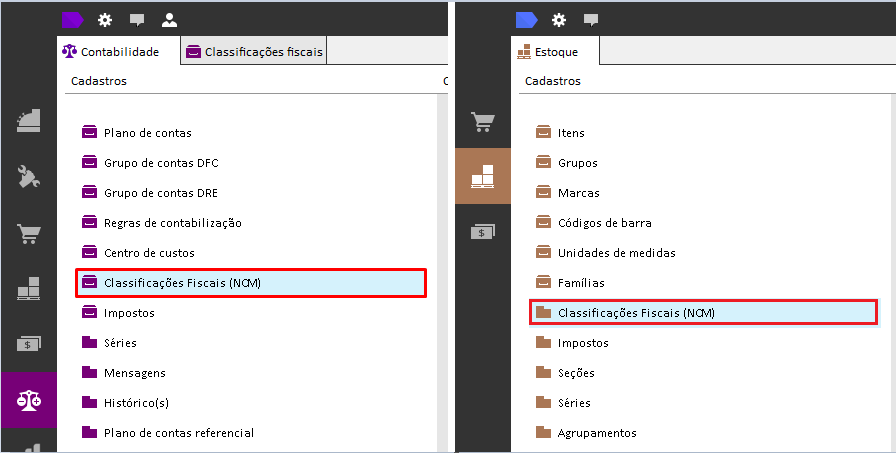
#### **Classificações Fiscais (NCM)**

<span style="white-space: pre-wrap;">Com a adequação à </span>**Reforma Tributária**<span style="white-space: pre-wrap;">, o cadastro de </span>**Classificações Fiscais (NCM)**<span style="white-space: pre-wrap;"> foi atualizado para contemplar os novos tributos </span>**CBS**<span style="white-space: pre-wrap;"> e </span>**IBS** <span style="white-space: pre-wrap;">e </span>**NBS**.  
<span style="white-space: pre-wrap;">Essa atualização permite que cada </span>**NCM**<span style="white-space: pre-wrap;"> esteja corretamente vinculada às </span>**Situações Tributárias CBS/IBS**, garantindo o cálculo e envio correto das informações fiscais.

<span style="white-space: pre-wrap;">📂 </span>**Caminhos de acesso:**

- **Ema ERP:**  
    `<span class="editor-theme-code">Estoque > Cadastros > Classificações Fiscais (NCM)</span>`
- **Ema ERPx:**  
    `<span class="editor-theme-code">Estoque > Cadastros > Classificações Fiscais (NCM)</span>`

[![image.png](https://kb.emasistemas.com.br/uploads/images/gallery/2025-10/scaled-1680-/ABJLHBW8WmV928op-image.png)](https://kb.emasistemas.com.br/uploads/images/gallery/2025-10/ABJLHBW8WmV928op-image.png)

##### Novas Configurações

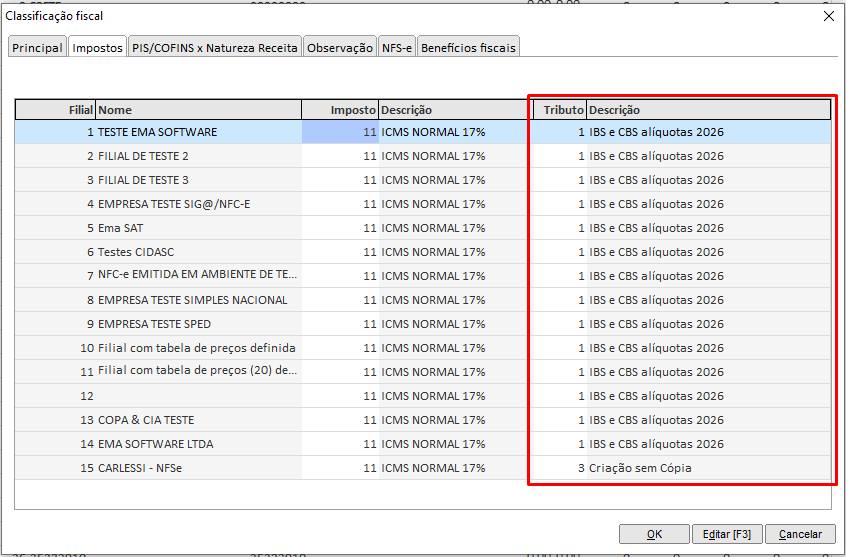
<span style="white-space: pre-wrap;">Foram incluídas as novas colunas "Tributo" e "Descrição" relacionadas à </span>**Reforma Tributária**<span style="white-space: pre-wrap;"> dentro do cadastro de NCM:</span>

[![image.png](https://kb.emasistemas.com.br/uploads/images/gallery/2025-10/scaled-1680-/Qgk1wezsVk8juEQ7-image.png)<span style="white-space: pre-wrap;"> </span>](https://kb.emasistemas.com.br/uploads/images/gallery/2025-10/Qgk1wezsVk8juEQ7-image.png)

#####   
Cadastro do Item

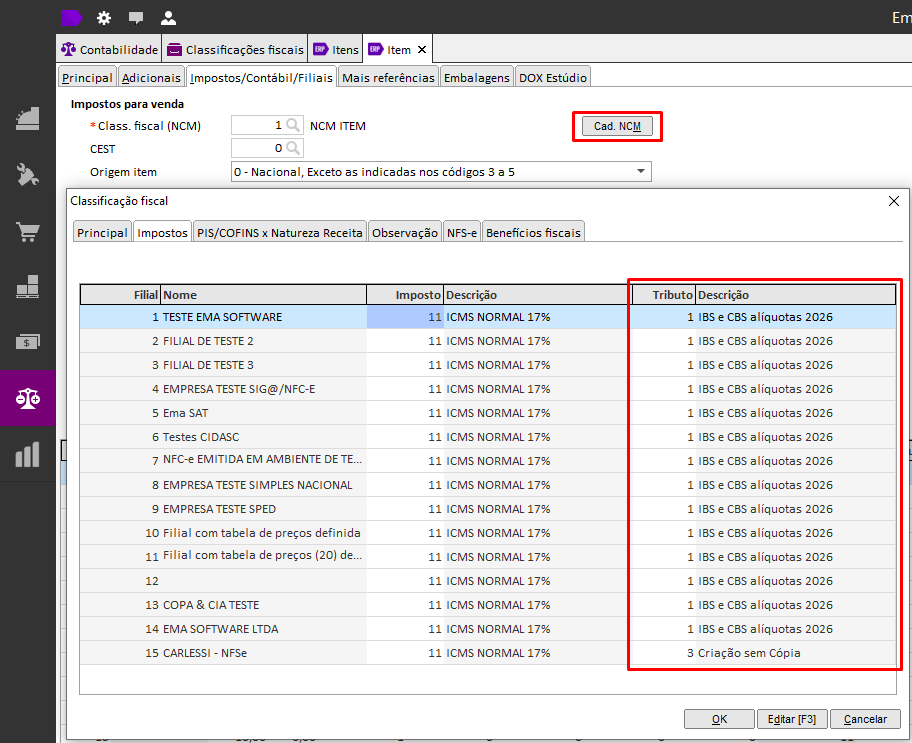
<span style="white-space: pre-wrap;">Os </span>**Tributos**<span style="white-space: pre-wrap;"> devem estar configurados na </span>**Classificações Tributárias (NCM)** <span style="white-space: pre-wrap;">e esse cadastro também é acessível pelo </span>**Cadastro de Itens.**

<span style="white-space: pre-wrap;">📂 </span>**Caminho de acesso:**  
`<span class="editor-theme-code">Ema ERP > Estoque > Cadastros > Itens > Aba: Impostos/Contábil/Filiais</span>`

[![image.png](https://kb.emasistemas.com.br/uploads/images/gallery/2025-10/scaled-1680-/kW2xPslSGcUClZa9-image.png)](https://kb.emasistemas.com.br/uploads/images/gallery/2025-10/kW2xPslSGcUClZa9-image.png)

#### **Situações Tributárias CBS/IBS**

<span style="white-space: pre-wrap;">Com a implementação da </span>**Reforma Tributária**<span style="white-space: pre-wrap;">, foram criadas novas </span>**situações tributárias**<span style="white-space: pre-wrap;"> específicas para os tributos </span>**CBS (Contribuição sobre Bens e Serviços)**<span style="white-space: pre-wrap;"> e </span>**IBS (Imposto sobre Bens e Serviços)**.  
<span style="white-space: pre-wrap;">Essas situações determinam o </span>**comportamento fiscal das operações**<span style="white-space: pre-wrap;"> e são utilizadas nos cadastros de </span>**Tributos**<span style="white-space: pre-wrap;">, </span>**Itens**<span style="white-space: pre-wrap;">, </span>**Pedidos**<span style="white-space: pre-wrap;"> e </span>**Notas Fiscais**.  
  
**⚠ IMPORTANTE: Os registros desse cadastro são importados da SEFAZ, por isso não há cadastro/edição, somente consulta!**

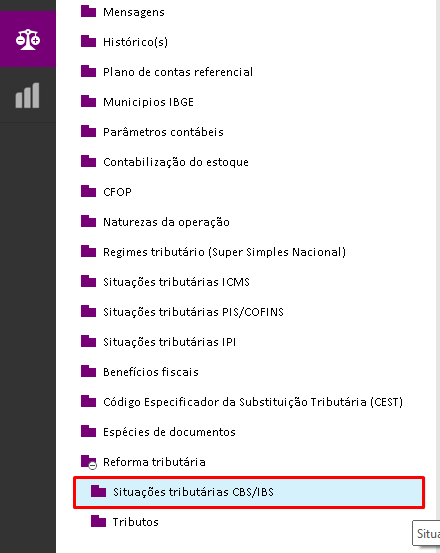
<span style="white-space: pre-wrap;">📂 </span>**Caminhos de acesso:**

- 
- **Ema ERP:**  
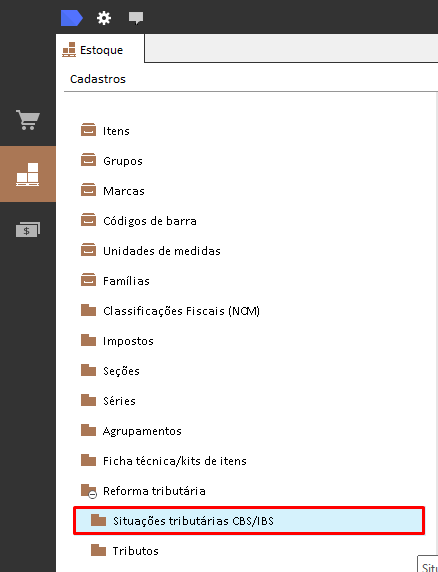
    `<span class="editor-theme-code">Contabilidade > Cadastros > Reforma Tributária > Situações Tributárias CBS/IBS</span>`  
      
    [![image.png](https://kb.emasistemas.com.br/uploads/images/gallery/2025-10/scaled-1680-/kjsTEE8TO1Gs3eBj-image.png)](https://kb.emasistemas.com.br/uploads/images/gallery/2025-10/kjsTEE8TO1Gs3eBj-image.png)
- **Ema ERPx:**  
    `<span class="editor-theme-code">Estoque > Cadastros > Reforma Tributária > Situações Tributárias CBS/IBS</span>`  
      
    [![image.png](https://kb.emasistemas.com.br/uploads/images/gallery/2025-10/scaled-1680-/hHIxNFHIMu9dtwzb-image.png)](https://kb.emasistemas.com.br/uploads/images/gallery/2025-10/hHIxNFHIMu9dtwzb-image.png)

##### Estrutura do Cadastro

<span style="white-space: pre-wrap;">A tela de </span>**Situação Tributária CBS/IBS**<span style="white-space: pre-wrap;"> contém as seguintes informações principais:</span>

- **Código e Descrição:**<span style="white-space: pre-wrap;"> Identificam a situação tributária no sistema.</span>
- **Tipo de Tributação:**<span style="white-space: pre-wrap;"> Define se a operação é </span>**tributada**<span style="white-space: pre-wrap;">, </span>**isenta**<span style="white-space: pre-wrap;">, </span>**suspensa**<span style="white-space: pre-wrap;"> ou </span>**não tributada**.
- **Origem da Operação:**<span style="white-space: pre-wrap;"> Determina o enquadramento conforme o tipo de operação (interna, interestadual ou de importação).</span>
- **Vinculação de Tributos:**<span style="white-space: pre-wrap;"> Permite associar a situação tributária aos cadastros de </span>**Tributos CBS/IBS**.  
      
    [![Gravar_2025_10_13_15_00_45_288.gif](https://kb.emasistemas.com.br/uploads/images/gallery/2025-10/po64EZmf2JNsTpMK-gravar-2025-10-13-15-00-45-288.gif)](https://kb.emasistemas.com.br/uploads/images/gallery/2025-10/po64EZmf2JNsTpMK-gravar-2025-10-13-15-00-45-288.gif)

##### Integração com o Cadastro de Tributos

<span style="white-space: pre-wrap;">As </span>**situações tributárias CBS/IBS**<span style="white-space: pre-wrap;"> são utilizadas diretamente no </span>**cadastro de Tributos**<span style="white-space: pre-wrap;">, definindo o </span>**comportamento fiscal e a aplicação das alíquotas**<span style="white-space: pre-wrap;"> em cada operação.</span>

Essa vinculação garante:

- Cálculo correto das bases e valores de CBS/IBS;
- Padronização entre as operações de venda, compra e importação;
- Conformidade com as regras da legislação vigente.

##### Materiais de apoio

- <span style="white-space: pre-wrap;">No portal Conformidade Fácil, em </span>**Serviços** <span style="white-space: pre-wrap;">você encontra materiais de apoio para auxiliar na configuração e também validação da NFe e NFCe, você pode acessar </span>[aqui](https://dfe-portal.svrs.rs.gov.br/Cff?utm_medium=email&utm_campaign=newsletter_acbr_061025&utm_source=RD+Station)<span style="white-space: pre-wrap;"> ou ainda cada tópico abaixo</span>
    - [Tabela Classificação Tributária](https://dfe-portal.svrs.rs.gov.br/CFF/ClassificacaoTributaria)<span style="white-space: pre-wrap;"> - Tabela de vinculos entre CST x Classificação Tributária, tipos de tributos, quais documentos eletronicos são permitidos, entre outros. </span>
- <span style="white-space: pre-wrap;">Além disso, encontramos um conteúdo bem bacana sobre </span>[Ligação da cClassTrib com CFOP/NCM/NBS](https://documentacao.senior.com.br/gestaoempresarialerp/5.10.4/menu_cadastros/f027lsf.htm)<span style="white-space: pre-wrap;"> que também pode ser utilizado para esclarecimento de duvidas e apoiar nossos clientes, consultores, unidades de negócio, etc.</span>

#### **Tributos**

<span style="color: rgb(68, 68, 68); background-color: rgb(255, 255, 255); white-space: pre-wrap;">Com a implementação da </span>**Reforma Tributária**<span style="color: rgb(68, 68, 68); background-color: rgb(255, 255, 255); white-space: pre-wrap;">, foram criadas novas </span>**situações tributárias**<span style="color: rgb(68, 68, 68); background-color: rgb(255, 255, 255); white-space: pre-wrap;"> específicas para os tributos </span>**CBS (Contribuição sobre Bens e Serviços)**<span style="color: rgb(68, 68, 68); background-color: rgb(255, 255, 255); white-space: pre-wrap;"> e </span>**IBS (Imposto sobre Bens e Serviços)**<span style="color: rgb(68, 68, 68); background-color: rgb(255, 255, 255);">.</span>  
<span style="color: rgb(68, 68, 68); background-color: rgb(255, 255, 255); white-space: pre-wrap;">Essas situações determinam o </span>**comportamento fiscal das operações**<span style="color: rgb(68, 68, 68); background-color: rgb(255, 255, 255); white-space: pre-wrap;"> e são utilizadas nos cadastros de </span>**Tributos**<span style="color: rgb(68, 68, 68); background-color: rgb(255, 255, 255); white-space: pre-wrap;">, </span>**Itens**<span style="color: rgb(68, 68, 68); background-color: rgb(255, 255, 255); white-space: pre-wrap;">, </span>**Pedidos**<span style="color: rgb(68, 68, 68); background-color: rgb(255, 255, 255); white-space: pre-wrap;"> e </span>**Notas Fiscais**<span style="color: rgb(68, 68, 68); background-color: rgb(255, 255, 255);">.</span>

<span style="white-space: pre-wrap;">📂 </span>**Caminhos de acesso:**

- 
- **No Ema ERP:**  
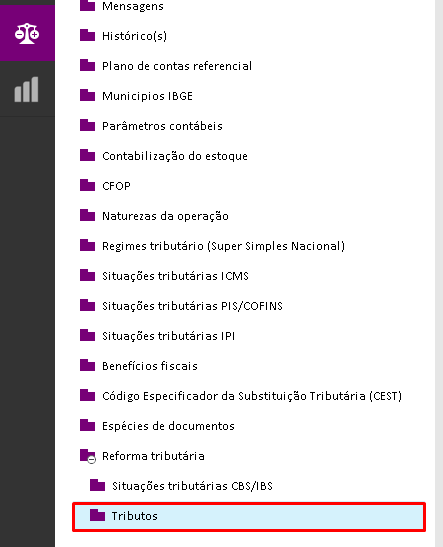
    `<span class="editor-theme-code">Contabilidade > Cadastros > Reforma Tributária > Tributos</span>`  
      
    [![image.png](https://kb.emasistemas.com.br/uploads/images/gallery/2025-10/scaled-1680-/5cDX5FgmNDI6E9Kh-image.png)](https://kb.emasistemas.com.br/uploads/images/gallery/2025-10/5cDX5FgmNDI6E9Kh-image.png)
- **No Ema ERPx:**  
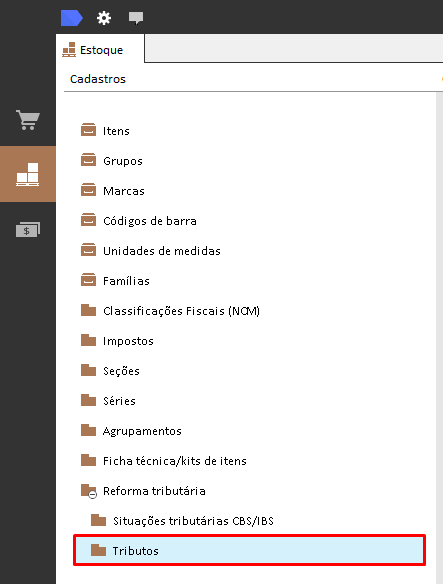
    `<span class="editor-theme-code">Estoque > Cadastros > Reforma Tributária > Tributos</span>`

[![image.png](https://kb.emasistemas.com.br/uploads/images/gallery/2025-10/scaled-1680-/9c0D7O6y44LVCHY0-image.png)](https://kb.emasistemas.com.br/uploads/images/gallery/2025-10/9c0D7O6y44LVCHY0-image.png)

#####   
Cadastros de Tributos

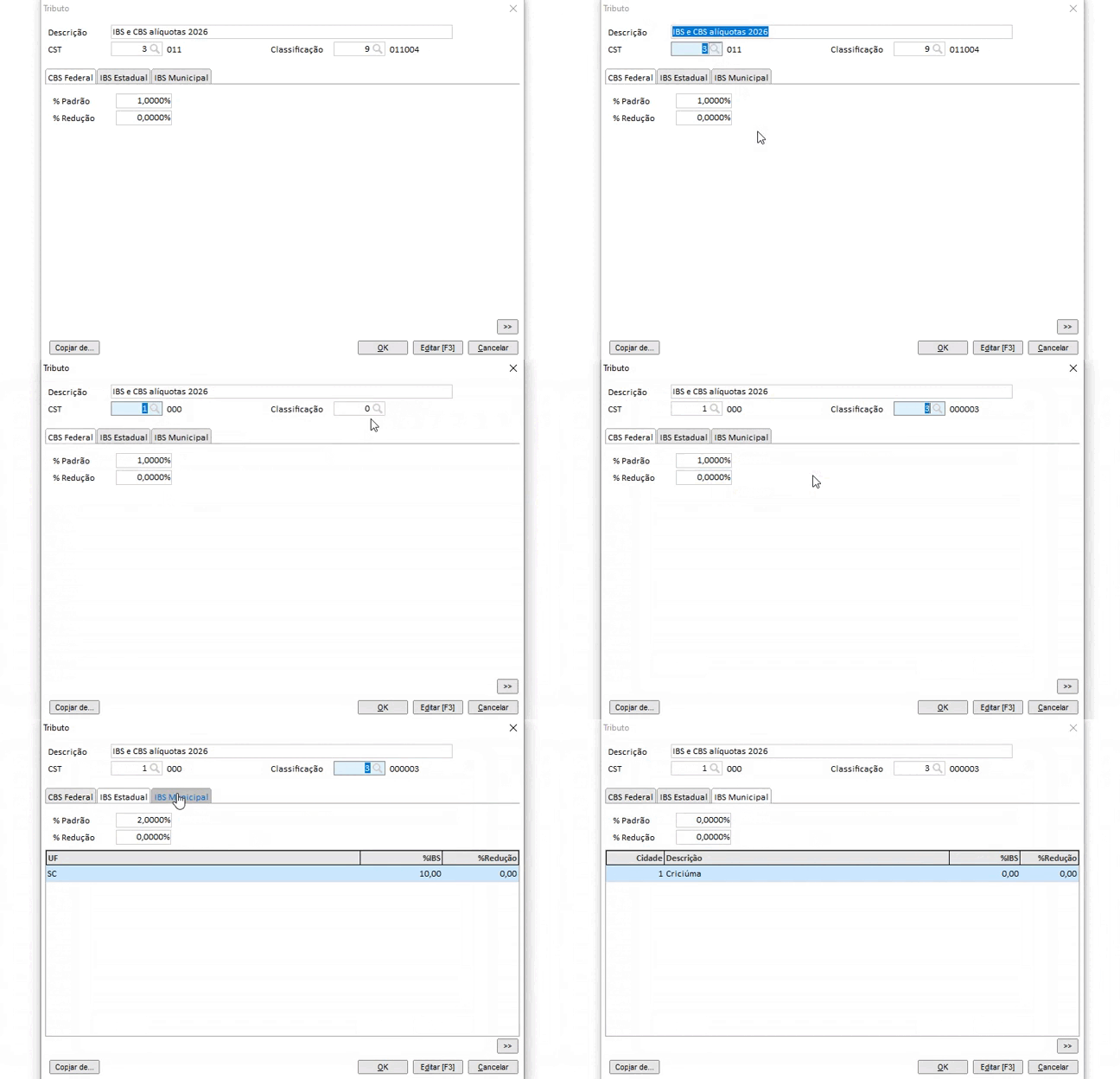
<span style="white-space: pre-wrap;">A tela de </span>**cadastro de tributo**<span style="white-space: pre-wrap;"> foi desenvolvida com </span>**três abas**<span style="white-space: pre-wrap;">, cada uma contendo suas </span>**respectivas configurações conforme a legislação**.  
<span style="white-space: pre-wrap;">Essas abas permitem definir corretamente os parâmetros fiscais necessários para o cálculo e envio das informações referentes à </span>**CBS**<span style="white-space: pre-wrap;"> e </span>**IBS**<span style="white-space: pre-wrap;">. </span>[Sobre o cadastro de CST e Classificação, temos essa documentação.](https://kb.emasistemas.com.br/books/contabil/page/cadastro-situacoes-tributarias-cbsibs)[![Gravar_2025_09_19_11_19_45_751.gif](https://kb.emasistemas.com.br/uploads/images/gallery/2025-09/9rLpAE5HYJy7eBn4-gravar-2025-09-19-11-19-45-751.gif)](https://kb.emasistemas.com.br/uploads/images/gallery/2025-09/9rLpAE5HYJy7eBn4-gravar-2025-09-19-11-19-45-751.gif)
##### Cadastro do Item

<span style="white-space: pre-wrap;">Após realizar os cadastros de </span>**Situações Tributárias CBS/IBS**<span style="white-space: pre-wrap;"> e </span>**Tributos**<span style="white-space: pre-wrap;">, é necessário </span>**vincular os tributos correspondentes aos itens**<span style="white-space: pre-wrap;"> do sistema.</span>

<u>**♦ Regras: assim como a coluna "Cód. imposto" a coluna "Cód. tributo" pode ser definido pelo NCM.**</u>

<span style="white-space: pre-wrap;">📂 </span>**Caminho de acesso:**  
`<span class="editor-theme-code">Ema ERP > Estoque > Cadastros > Itens > Aba: Impostos/Contábil/Filiais</span>`

  
[![image.png](https://kb.emasistemas.com.br/uploads/images/gallery/2025-10/scaled-1680-/6TxLUJSmCEvKa6Yd-image.png)](https://kb.emasistemas.com.br/uploads/images/gallery/2025-10/6TxLUJSmCEvKa6Yd-image.png)

### Operações

#### **Nota Fiscal de Entrada**

<span style="white-space: pre-wrap;">A operação de Nota Fiscal de Entrada permanece inalterada para o usuário final. No entanto, ao incluir itens com configurações de </span>**Impostos da Reforma Tributária**, as novas informações são gravadas automaticamente no Banco de Dados e serão enviadas à SEFAZ na transmissão da NF-e.

**📂 Caminhos de Acesso**

**Ema ERP / Ema ERPx:**  
`<span class="editor-theme-code">Compras> Operações > Criar nota fiscal de entrada</span>`

##### Passo a Passo da Operação

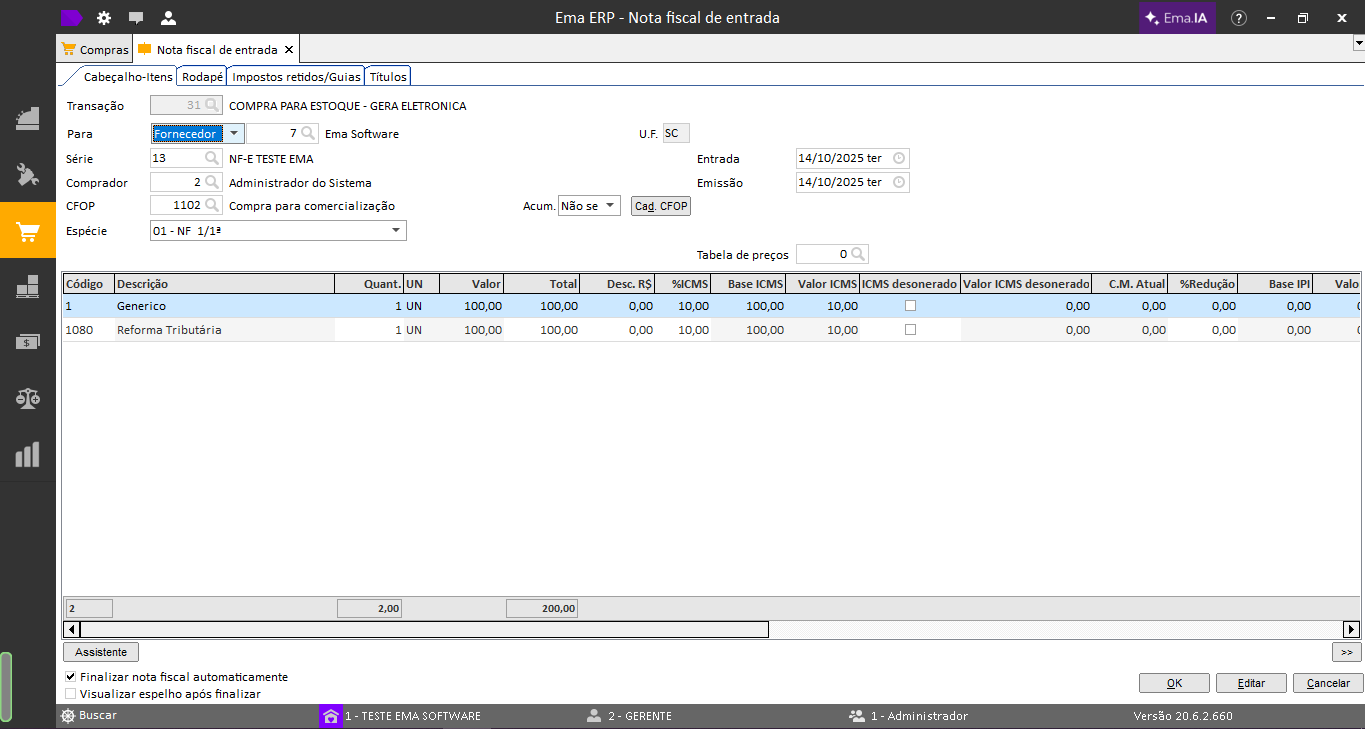
> **Exemplo:**<span style="white-space: pre-wrap;"> Nota Fiscal de Entrada com 2 itens, sendo </span>**um com configuração da Reforma Tributária**:
> 
> 1. Criar uma nova Nota Fiscal de Entrada com os itens desejados.
> 2. Informar os itens normalmente, sem necessidade de campos adicionais para a Reforma Tributária.
> 3. Transmitir a NF-e.

<table class="align-center" id="bkmrk-c%C3%B3digodescri%C3%A7%C3%A3oconfi" style="box-sizing: border-box; outline-color: rgb(41, 44, 63); outline-width: 1px; margin: 0.3em auto 1.375em; padding: 0px; border: 0px; font-style: normal; font-variant-ligatures: normal; font-variant-caps: normal; font-variant-numeric: inherit; font-variant-east-asian: inherit; font-variant-alternates: inherit; font-variant-position: inherit; font-variant-emoji: inherit; font-weight: 400; font-stretch: inherit; font-size: 14px; line-height: inherit; font-family: -apple-system, BlinkMacSystemFont, "Segoe UI", Oxygen, Ubuntu, Roboto, Cantarell, "Fira Sans", "Droid Sans", "Helvetica Neue", sans-serif; font-optical-sizing: inherit; font-size-adjust: inherit; font-kerning: inherit; font-feature-settings: inherit; font-variation-settings: inherit; vertical-align: baseline; border-collapse: collapse; border-spacing: 0px; min-width: 100px; max-width: 100%; hyphens: auto; table-layout: fixed; text-align: center; color: rgb(68, 68, 68); letter-spacing: normal; orphans: 2; text-transform: none; widows: 2; word-spacing: 0px; -webkit-text-stroke-width: 0px; white-space: normal; background-color: rgb(255, 255, 255); text-decoration-thickness: initial; text-decoration-style: initial; text-decoration-color: initial;"><colgroup><col></col><col></col><col></col></colgroup><tbody><tr style="box-sizing: border-box; outline-color: rgb(41, 44, 63); outline-width: 1px; margin: 0px; padding: 0px; border: 0px; font: inherit; vertical-align: baseline;"><th style="box-sizing: border-box; outline-color: rgb(41, 44, 63); outline-width: 1px; margin: 0px; padding: 6px 8px; border: 1px solid rgb(221, 221, 221); font-style: inherit; font-variant: inherit; font-weight: inherit; font-stretch: inherit; font-size: inherit; line-height: 1.2; font-family: inherit; font-optical-sizing: inherit; font-size-adjust: inherit; font-kerning: inherit; font-feature-settings: inherit; font-variation-settings: inherit; vertical-align: top; min-width: 10px; overflow: auto; word-break: break-word;">**Código**

</th><th style="box-sizing: border-box; outline-color: rgb(41, 44, 63); outline-width: 1px; margin: 0px; padding: 6px 8px; border: 1px solid rgb(221, 221, 221); font-style: inherit; font-variant: inherit; font-weight: inherit; font-stretch: inherit; font-size: inherit; line-height: 1.2; font-family: inherit; font-optical-sizing: inherit; font-size-adjust: inherit; font-kerning: inherit; font-feature-settings: inherit; font-variation-settings: inherit; vertical-align: top; min-width: 10px; overflow: auto; word-break: break-word;">**Descrição**

</th><th style="box-sizing: border-box; outline-color: rgb(41, 44, 63); outline-width: 1px; margin: 0px; padding: 6px 8px; border: 1px solid rgb(221, 221, 221); font-style: inherit; font-variant: inherit; font-weight: inherit; font-stretch: inherit; font-size: inherit; line-height: 1.2; font-family: inherit; font-optical-sizing: inherit; font-size-adjust: inherit; font-kerning: inherit; font-feature-settings: inherit; font-variation-settings: inherit; vertical-align: top; min-width: 10px; overflow: auto; word-break: break-word;">**Config. Reforma Tributária?**

</th></tr><tr style="box-sizing: border-box; outline-color: rgb(41, 44, 63); outline-width: 1px; margin: 0px; padding: 0px; border: 0px; font: inherit; vertical-align: baseline;"><td style="box-sizing: border-box; outline-color: rgb(41, 44, 63); outline-width: 1px; margin: 0px; padding: 6px 8px; border: 1px solid rgb(221, 221, 221); font-style: inherit; font-variant: inherit; font-weight: inherit; font-stretch: inherit; font-size: inherit; line-height: 1.2; font-family: inherit; font-optical-sizing: inherit; font-size-adjust: inherit; font-kerning: inherit; font-feature-settings: inherit; font-variation-settings: inherit; vertical-align: top; min-width: 10px; overflow: auto; word-break: break-word;">1

</td><td style="box-sizing: border-box; outline-color: rgb(41, 44, 63); outline-width: 1px; margin: 0px; padding: 6px 8px; border: 1px solid rgb(221, 221, 221); font-style: inherit; font-variant: inherit; font-weight: inherit; font-stretch: inherit; font-size: inherit; line-height: 1.2; font-family: inherit; font-optical-sizing: inherit; font-size-adjust: inherit; font-kerning: inherit; font-feature-settings: inherit; font-variation-settings: inherit; vertical-align: top; min-width: 10px; overflow: auto; word-break: break-word;">Genérico

</td><td style="box-sizing: border-box; outline-color: rgb(41, 44, 63); outline-width: 1px; margin: 0px; padding: 6px 8px; border: 1px solid rgb(221, 221, 221); font-style: inherit; font-variant: inherit; font-weight: inherit; font-stretch: inherit; font-size: inherit; line-height: 1.2; font-family: inherit; font-optical-sizing: inherit; font-size-adjust: inherit; font-kerning: inherit; font-feature-settings: inherit; font-variation-settings: inherit; vertical-align: top; min-width: 10px; overflow: auto; word-break: break-word;">Não

</td></tr><tr style="box-sizing: border-box; outline-color: rgb(41, 44, 63); outline-width: 1px; margin: 0px; padding: 0px; border: 0px; font: inherit; vertical-align: baseline;"><td style="box-sizing: border-box; outline-color: rgb(41, 44, 63); outline-width: 1px; margin: 0px; padding: 6px 8px; border: 1px solid rgb(221, 221, 221); font-style: inherit; font-variant: inherit; font-weight: inherit; font-stretch: inherit; font-size: inherit; line-height: 1.2; font-family: inherit; font-optical-sizing: inherit; font-size-adjust: inherit; font-kerning: inherit; font-feature-settings: inherit; font-variation-settings: inherit; vertical-align: top; min-width: 10px; overflow: auto; word-break: break-word;">1080

</td><td class="align-center" style="box-sizing: border-box; outline-color: rgb(41, 44, 63); outline-width: 1px; margin: 0px; padding: 6px 8px; border: 1px solid rgb(221, 221, 221); font-style: inherit; font-variant: inherit; font-weight: inherit; font-stretch: inherit; font-size: inherit; line-height: 1.2; font-family: inherit; font-optical-sizing: inherit; font-size-adjust: inherit; font-kerning: inherit; font-feature-settings: inherit; font-variation-settings: inherit; vertical-align: top; min-width: 10px; overflow: auto; word-break: break-word; text-align: center;">Reforma Tributária

</td><td class="align-center" style="box-sizing: border-box; outline-color: rgb(41, 44, 63); outline-width: 1px; margin: 0px; padding: 6px 8px; border: 1px solid rgb(221, 221, 221); font-style: inherit; font-variant: inherit; font-weight: inherit; font-stretch: inherit; font-size: inherit; line-height: 1.2; font-family: inherit; font-optical-sizing: inherit; font-size-adjust: inherit; font-kerning: inherit; font-feature-settings: inherit; font-variation-settings: inherit; vertical-align: top; min-width: 10px; overflow: auto; word-break: break-word; text-align: center;">Sim

</td></tr></tbody></table>

[![image.png](https://kb.emasistemas.com.br/uploads/images/gallery/2025-10/scaled-1680-/Losqztaeg7VA8TE4-image.png)](https://kb.emasistemas.com.br/uploads/images/gallery/2025-10/Losqztaeg7VA8TE4-image.png)

##### Resultados Esperados

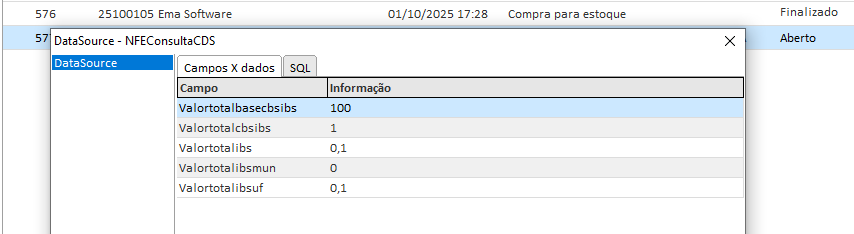
<span style="white-space: pre-wrap;">Ao consultar todos os dados da NFE </span>`<span class="editor-theme-code">[CTRL + SHIFT + D]</span>`, os seguintes campos estarão disponíveis:

- `<span class="editor-theme-code">VALORTOTALBASECBSIBS</span>`
- `<span class="editor-theme-code">VALORTOTALCBSIBS</span>`
- `<span class="editor-theme-code">VALORTOTALIBS</span>`
- `<span class="editor-theme-code">VALORTOTALIBSMUN</span>`
- `<span class="editor-theme-code">VALORTOTALIBSUF</span>`
- `<span class="editor-theme-code">VALORTOTALCBS</span>`

[![image.png](https://kb.emasistemas.com.br/uploads/images/gallery/2025-10/scaled-1680-/5m4oEX0m36TMULFq-image.png)](https://kb.emasistemas.com.br/uploads/images/gallery/2025-10/5m4oEX0m36TMULFq-image.png)

##### Consulta Banco de Dados

É possível consultar diretamente no Banco de Dados utilizando os comandos abaixo:

```
SELECT IDTRIBUTO, 
       IDSITUACAO,
       IDCLASSTRIB,
       CSTCBSIBS, 
       CLASSTRIBCBSIBS, 
       PERCCBS,
       PERCIBSMUN, 
       PERCIBSUF,
       PERCREDUCAOCBS, 
       PERCREDUCAOIBSUF,
       PERCREDUCAOIBSMUN, 
       VALORBASECBSIBS, 
       VALORCBS,
       VALORIBSUF, 
       VALORIBSMUN, 
       VALORIBS, 
       PERCEFETIBSMUN, 
       PERCEFETIBSUF, 
       PERCEFETCBS, 
       VALORCBSIBS
  FROM NFE_ITEM 
 WHERE IDNFE = 576
```

```
SELECT VALORTOTALBASECBSIBS,
       VALORTOTALCBS,
       VALORTOTALIBSUF,
       VALORTOTALIBSMUN,
       VALORTOTALIBS,
       VALORTOTALCBSIBS
  FROM NFE
 WHERE IDNFE = 576
```

Em relação a devoluções, realizamos o seguinte questionamento a nossa contabilidade: Foi emitido NFe em 28/12/25 e agora precisa realizar a nota de devolução em 10/01/26 (Ou seja, entrou em vigor as NTs da Reforma tributária ref as alíquotas testes), neste caso como ficam o comportamento do IBC/CBS visto que não teve na venda?

<span style="color: rgb(224, 62, 45);">Resposta:</span><span style="white-space: pre-wrap;"> Não há previsão específica na lei sobre operações de devolução em período de transição, nem sobre comportamento de IBS/CBS nestes casos.</span>

Novas informações vamos atualizar a documentação.

##### Observações / Boas práticas

- <span style="white-space: pre-wrap;">Os campos da Reforma Tributária são gravados no Banco de Dados, mas </span>**não são exibidos na interface da Nota Fiscal de Entrada**.
- <span style="white-space: pre-wrap;">Ao faturar uma Ordem de Compra, essas informações são automaticamente levadas para a </span>**Nota Fiscal de Entrada**.
- Garantir que os itens estejam previamente configurados com os tributos da Reforma Tributária, conforme o cadastro de NCM.

#### **Nota Fiscal de Saída**

<span style="white-space: pre-wrap;">A operação de Nota Fiscal de Saída permanece inalterada para o usuário final. No entanto, ao incluir itens com configurações de </span>**Impostos da Reforma Tributária**, as novas informações são gravadas automaticamente no Banco de Dados e serão enviadas à SEFAZ na transmissão da NF-e.

**📂 Caminhos de Acesso**

**Ema ERP / Ema ERPx:**  
`<span class="editor-theme-code">Vendas > Operações > Criar nota fiscal de saída</span>`

##### Passo a Passo da Operação

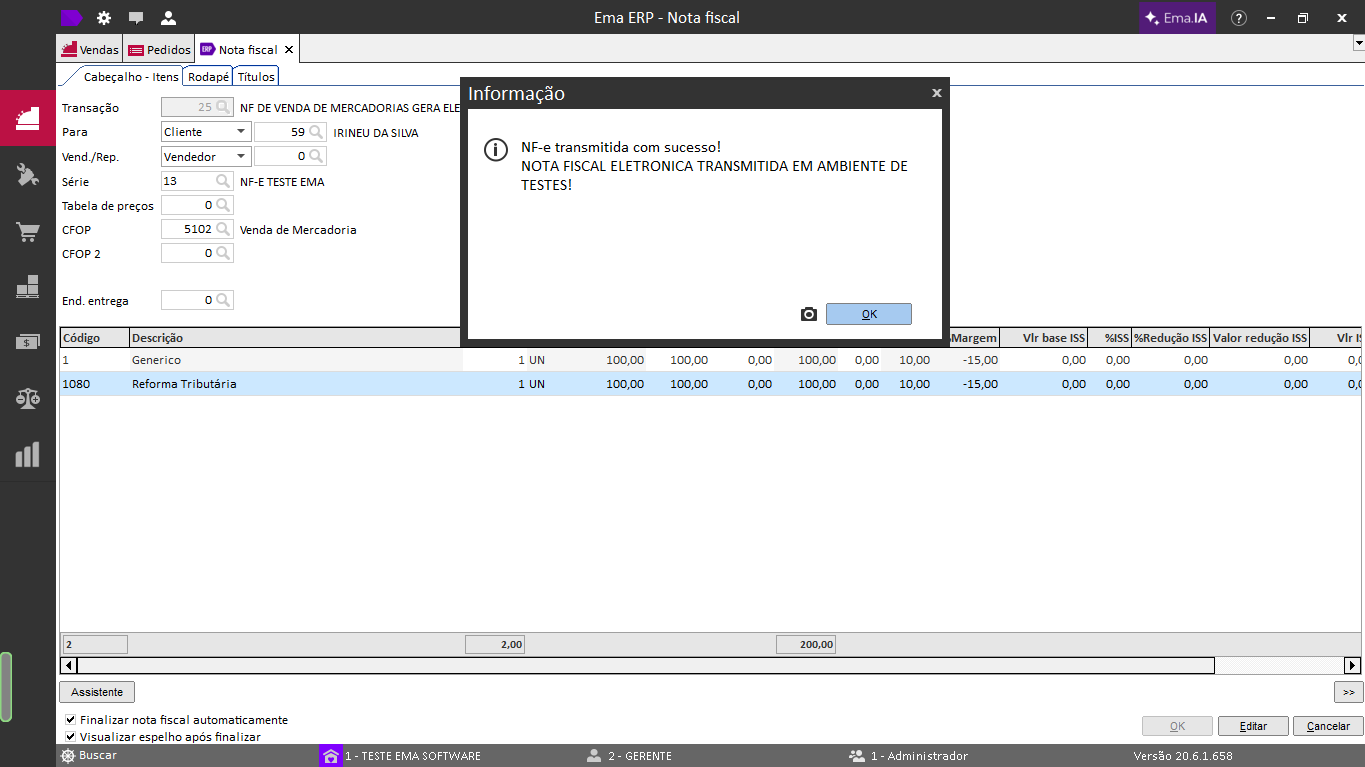
> **Exemplo:**<span style="white-space: pre-wrap;"> NFS com 2 itens, sendo </span>**um com configuração da Reforma Tributária**:
> 
> 1. Criar uma nova Nota Fiscal de Saída com os itens desejados.
> 2. Informar os itens normalmente, sem necessidade de campos adicionais para a Reforma Tributária.
> 3. Transmitir a NF-e.

<table class="align-center" id="bkmrk-c%C3%B3digodescri%C3%A7%C3%A3oconfi-1" style="box-sizing: border-box; outline-color: rgb(41, 44, 63); outline-width: 1px; margin: 0.3em auto 1.375em; padding: 0px; border: 0px; font-style: normal; font-variant-ligatures: normal; font-variant-caps: normal; font-variant-numeric: inherit; font-variant-east-asian: inherit; font-variant-alternates: inherit; font-variant-position: inherit; font-variant-emoji: inherit; font-weight: 400; font-stretch: inherit; font-size: 14px; line-height: inherit; font-family: -apple-system, BlinkMacSystemFont, "Segoe UI", Oxygen, Ubuntu, Roboto, Cantarell, "Fira Sans", "Droid Sans", "Helvetica Neue", sans-serif; font-optical-sizing: inherit; font-size-adjust: inherit; font-kerning: inherit; font-feature-settings: inherit; font-variation-settings: inherit; vertical-align: baseline; border-collapse: collapse; border-spacing: 0px; min-width: 100px; max-width: 100%; hyphens: auto; table-layout: fixed; text-align: center; color: rgb(68, 68, 68); letter-spacing: normal; orphans: 2; text-transform: none; widows: 2; word-spacing: 0px; -webkit-text-stroke-width: 0px; white-space: normal; background-color: rgb(255, 255, 255); text-decoration-thickness: initial; text-decoration-style: initial; text-decoration-color: initial;"><colgroup><col></col><col></col><col></col></colgroup><tbody><tr style="box-sizing: border-box; outline-color: rgb(41, 44, 63); outline-width: 1px; margin: 0px; padding: 0px; border: 0px; font: inherit; vertical-align: baseline;"><th style="box-sizing: border-box; outline-color: rgb(41, 44, 63); outline-width: 1px; margin: 0px; padding: 6px 8px; border: 1px solid rgb(221, 221, 221); font-style: inherit; font-variant: inherit; font-weight: inherit; font-stretch: inherit; font-size: inherit; line-height: 1.2; font-family: inherit; font-optical-sizing: inherit; font-size-adjust: inherit; font-kerning: inherit; font-feature-settings: inherit; font-variation-settings: inherit; vertical-align: top; min-width: 10px; overflow: auto; word-break: break-word;">**Código**

</th><th style="box-sizing: border-box; outline-color: rgb(41, 44, 63); outline-width: 1px; margin: 0px; padding: 6px 8px; border: 1px solid rgb(221, 221, 221); font-style: inherit; font-variant: inherit; font-weight: inherit; font-stretch: inherit; font-size: inherit; line-height: 1.2; font-family: inherit; font-optical-sizing: inherit; font-size-adjust: inherit; font-kerning: inherit; font-feature-settings: inherit; font-variation-settings: inherit; vertical-align: top; min-width: 10px; overflow: auto; word-break: break-word;">**Descrição**

</th><th style="box-sizing: border-box; outline-color: rgb(41, 44, 63); outline-width: 1px; margin: 0px; padding: 6px 8px; border: 1px solid rgb(221, 221, 221); font-style: inherit; font-variant: inherit; font-weight: inherit; font-stretch: inherit; font-size: inherit; line-height: 1.2; font-family: inherit; font-optical-sizing: inherit; font-size-adjust: inherit; font-kerning: inherit; font-feature-settings: inherit; font-variation-settings: inherit; vertical-align: top; min-width: 10px; overflow: auto; word-break: break-word;">**Config. Reforma Tributária?**

</th></tr><tr style="box-sizing: border-box; outline-color: rgb(41, 44, 63); outline-width: 1px; margin: 0px; padding: 0px; border: 0px; font: inherit; vertical-align: baseline;"><td style="box-sizing: border-box; outline-color: rgb(41, 44, 63); outline-width: 1px; margin: 0px; padding: 6px 8px; border: 1px solid rgb(221, 221, 221); font-style: inherit; font-variant: inherit; font-weight: inherit; font-stretch: inherit; font-size: inherit; line-height: 1.2; font-family: inherit; font-optical-sizing: inherit; font-size-adjust: inherit; font-kerning: inherit; font-feature-settings: inherit; font-variation-settings: inherit; vertical-align: top; min-width: 10px; overflow: auto; word-break: break-word;">1

</td><td style="box-sizing: border-box; outline-color: rgb(41, 44, 63); outline-width: 1px; margin: 0px; padding: 6px 8px; border: 1px solid rgb(221, 221, 221); font-style: inherit; font-variant: inherit; font-weight: inherit; font-stretch: inherit; font-size: inherit; line-height: 1.2; font-family: inherit; font-optical-sizing: inherit; font-size-adjust: inherit; font-kerning: inherit; font-feature-settings: inherit; font-variation-settings: inherit; vertical-align: top; min-width: 10px; overflow: auto; word-break: break-word;">Genérico

</td><td style="box-sizing: border-box; outline-color: rgb(41, 44, 63); outline-width: 1px; margin: 0px; padding: 6px 8px; border: 1px solid rgb(221, 221, 221); font-style: inherit; font-variant: inherit; font-weight: inherit; font-stretch: inherit; font-size: inherit; line-height: 1.2; font-family: inherit; font-optical-sizing: inherit; font-size-adjust: inherit; font-kerning: inherit; font-feature-settings: inherit; font-variation-settings: inherit; vertical-align: top; min-width: 10px; overflow: auto; word-break: break-word;">Não

</td></tr><tr style="box-sizing: border-box; outline-color: rgb(41, 44, 63); outline-width: 1px; margin: 0px; padding: 0px; border: 0px; font: inherit; vertical-align: baseline;"><td style="box-sizing: border-box; outline-color: rgb(41, 44, 63); outline-width: 1px; margin: 0px; padding: 6px 8px; border: 1px solid rgb(221, 221, 221); font-style: inherit; font-variant: inherit; font-weight: inherit; font-stretch: inherit; font-size: inherit; line-height: 1.2; font-family: inherit; font-optical-sizing: inherit; font-size-adjust: inherit; font-kerning: inherit; font-feature-settings: inherit; font-variation-settings: inherit; vertical-align: top; min-width: 10px; overflow: auto; word-break: break-word;">1080

</td><td class="align-center" style="box-sizing: border-box; outline-color: rgb(41, 44, 63); outline-width: 1px; margin: 0px; padding: 6px 8px; border: 1px solid rgb(221, 221, 221); font-style: inherit; font-variant: inherit; font-weight: inherit; font-stretch: inherit; font-size: inherit; line-height: 1.2; font-family: inherit; font-optical-sizing: inherit; font-size-adjust: inherit; font-kerning: inherit; font-feature-settings: inherit; font-variation-settings: inherit; vertical-align: top; min-width: 10px; overflow: auto; word-break: break-word; text-align: center;">Reforma Tributária

</td><td class="align-center" style="box-sizing: border-box; outline-color: rgb(41, 44, 63); outline-width: 1px; margin: 0px; padding: 6px 8px; border: 1px solid rgb(221, 221, 221); font-style: inherit; font-variant: inherit; font-weight: inherit; font-stretch: inherit; font-size: inherit; line-height: 1.2; font-family: inherit; font-optical-sizing: inherit; font-size-adjust: inherit; font-kerning: inherit; font-feature-settings: inherit; font-variation-settings: inherit; vertical-align: top; min-width: 10px; overflow: auto; word-break: break-word; text-align: center;">Sim

</td></tr></tbody></table>

[![image.png](https://kb.emasistemas.com.br/uploads/images/gallery/2025-10/scaled-1680-/V6CMnrIb146JPtLW-image.png)](https://kb.emasistemas.com.br/uploads/images/gallery/2025-10/V6CMnrIb146JPtLW-image.png)

##### Resultados Esperados

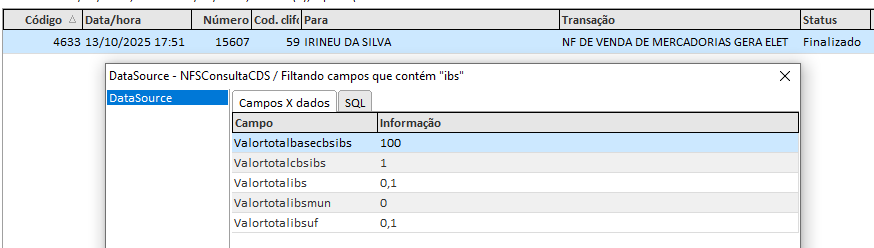
<span style="white-space: pre-wrap;">Ao consultar todos os dados da NFS </span>`<span class="editor-theme-code">[CTRL + SHIFT + D]</span>`, os seguintes campos estarão disponíveis:

- `<span class="editor-theme-code">VALORTOTALBASECBSIBS</span>`
- `<span class="editor-theme-code">VALORTOTALCBSIBS</span>`
- `<span class="editor-theme-code">VALORTOTALIBS</span>`
- `<span class="editor-theme-code">VALORTOTALIBSMUN</span>`
- `<span class="editor-theme-code">VALORTOTALIBSUF</span>`
- `<span class="editor-theme-code">VALORTOTALCBS</span>`

[![image.png](https://kb.emasistemas.com.br/uploads/images/gallery/2025-10/scaled-1680-/MkVS4suLJbte5eCW-image.png)](https://kb.emasistemas.com.br/uploads/images/gallery/2025-10/MkVS4suLJbte5eCW-image.png)

##### Consulta Banco de Dados

É possível consultar diretamente no Banco de Dados utilizando os comandos abaixo:

```
SELECT IDTRIBUTO, 
       IDSITUACAO,
       IDCLASSTRIB,
       CSTCBSIBS, 
       CLASSTRIBCBSIBS, 
       PERCCBS,
       PERCIBSMUN, 
       PERCIBSUF,
       PERCREDUCAOCBS, 
       PERCREDUCAOIBSUF,
       PERCREDUCAOIBSMUN, 
       VALORBASECBSIBS, 
       VALORCBS,
       VALORIBSUF, 
       VALORIBSMUN, 
       VALORIBS, 
       PERCEFETIBSMUN, 
       PERCEFETIBSUF, 
       PERCEFETCBS, 
       VALORCBSIBS
  FROM NFS_ITEM 
 WHERE IDNFS = 4633
```

```
SELECT VALORTOTALBASECBSIBS,
       VALORTOTALCBS,
       VALORTOTALIBSUF,
       VALORTOTALIBSMUN,
       VALORTOTALIBS,
       VALORTOTALCBSIBS
  FROM NFS
 WHERE IDNFS = 4633
```

##### Devolução de NFS

Em relação a devoluções, realizamos o seguinte questionamento a nossa contabilidade: Foi emitido NFe em 28/12/25 e agora precisa realizar a nota de devolução em 10/01/26 (Ou seja, entrou em vigor as NTs da Reforma tributária ref as alíquotas testes), neste caso como ficam o comportamento do IBC/CBS visto que não teve na venda?

<span style="color: rgb(224, 62, 45);">Resposta:</span><span style="white-space: pre-wrap;"> Não há previsão específica na lei sobre operações de devolução em período de transição, nem sobre comportamento de IBS/CBS nestes casos.</span>

Novas informações vamos atualizar a documentação.

##### Observações / Boas práticas

- <span style="white-space: pre-wrap;">Os campos da Reforma Tributária são gravados no Banco de Dados, mas </span>**não são exibidos na interface da Nota Fiscal de Saída**.
- <span style="white-space: pre-wrap;">Ao faturar um pedido, essas informações são automaticamente levadas para a </span>**Nota Fiscal de Saída**.
- Garantir que os itens estejam previamente configurados com os tributos da Reforma Tributária, conforme o cadastro de NCM.

#### **Ordem de Compra**

<span style="white-space: pre-wrap;">A operação de Ordem de Compra permanece inalterada para o usuário final. No entanto, ao incluir itens com configurações de </span>**Impostos da Reforma Tributária**, as novas informações são gravadas automaticamente no Banco de Dados. Essas informações serão posteriormente utilizadas no faturamento e emissão da Nota Fiscal de Entrada.

**📂 Caminhos de Acesso**

**Ema ERP / Ema ERPx:**  
`<span class="editor-theme-code">Compras > Operações > Criar Ordem de Compra</span>`

##### Passo a Passo da Operação

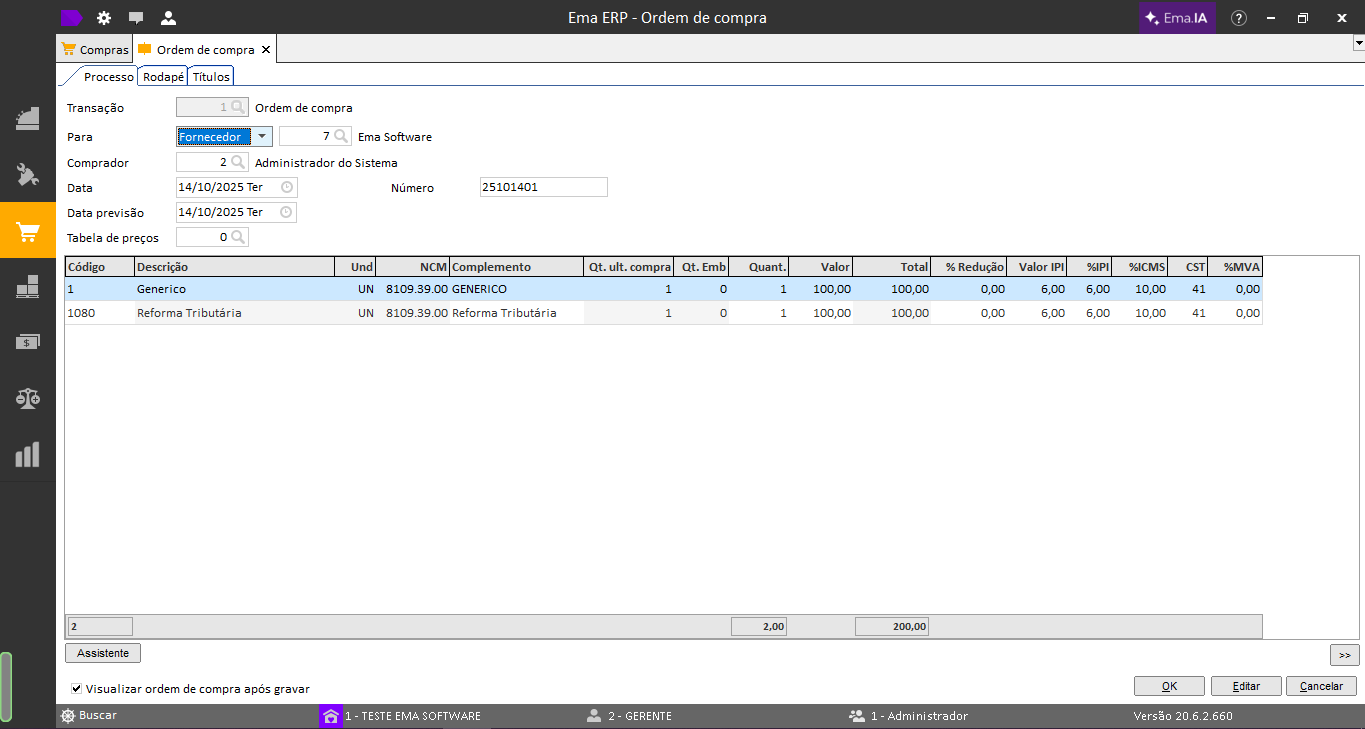
> **Exemplo:**<span style="white-space: pre-wrap;"> Ordem de Compra com 2 itens, sendo</span> **um com configuração da Reforma Tributária:**
> 
> 1. Criar uma nova Ordem de Compra com os itens desejados.
> 2. Informar os itens normalmente, sem necessidade de campos adicionais para a Reforma Tributária.
> 3. Salvar o Ordem de Compra.

<table class="align-center" id="bkmrk-c%C3%B3digodescri%C3%A7%C3%A3oconfi-2" style="box-sizing: border-box; outline-color: rgb(41, 44, 63); outline-width: 1px; margin: 0.3em auto 1.375em; padding: 0px; border: 0px; font-style: normal; font-variant-ligatures: normal; font-variant-caps: normal; font-variant-numeric: inherit; font-variant-east-asian: inherit; font-variant-alternates: inherit; font-variant-position: inherit; font-variant-emoji: inherit; font-weight: 400; font-stretch: inherit; font-size: 14px; line-height: inherit; font-family: -apple-system, BlinkMacSystemFont, "Segoe UI", Oxygen, Ubuntu, Roboto, Cantarell, "Fira Sans", "Droid Sans", "Helvetica Neue", sans-serif; font-optical-sizing: inherit; font-size-adjust: inherit; font-kerning: inherit; font-feature-settings: inherit; font-variation-settings: inherit; vertical-align: baseline; border-collapse: collapse; border-spacing: 0px; min-width: 100px; max-width: 100%; hyphens: auto; table-layout: fixed; text-align: center; color: rgb(68, 68, 68); letter-spacing: normal; orphans: 2; text-transform: none; widows: 2; word-spacing: 0px; -webkit-text-stroke-width: 0px; white-space: normal; background-color: rgb(255, 255, 255); text-decoration-thickness: initial; text-decoration-style: initial; text-decoration-color: initial;"><colgroup><col></col><col></col><col></col></colgroup><tbody><tr style="box-sizing: border-box; outline-color: rgb(41, 44, 63); outline-width: 1px; margin: 0px; padding: 0px; border: 0px; font: inherit; vertical-align: baseline;"><th style="box-sizing: border-box; outline-color: rgb(41, 44, 63); outline-width: 1px; margin: 0px; padding: 6px 8px; border: 1px solid rgb(221, 221, 221); font-style: inherit; font-variant: inherit; font-weight: inherit; font-stretch: inherit; font-size: inherit; line-height: 1.2; font-family: inherit; font-optical-sizing: inherit; font-size-adjust: inherit; font-kerning: inherit; font-feature-settings: inherit; font-variation-settings: inherit; vertical-align: top; min-width: 10px; overflow: auto; word-break: break-word;">**Código**

</th><th style="box-sizing: border-box; outline-color: rgb(41, 44, 63); outline-width: 1px; margin: 0px; padding: 6px 8px; border: 1px solid rgb(221, 221, 221); font-style: inherit; font-variant: inherit; font-weight: inherit; font-stretch: inherit; font-size: inherit; line-height: 1.2; font-family: inherit; font-optical-sizing: inherit; font-size-adjust: inherit; font-kerning: inherit; font-feature-settings: inherit; font-variation-settings: inherit; vertical-align: top; min-width: 10px; overflow: auto; word-break: break-word;">**Descrição**

</th><th style="box-sizing: border-box; outline-color: rgb(41, 44, 63); outline-width: 1px; margin: 0px; padding: 6px 8px; border: 1px solid rgb(221, 221, 221); font-style: inherit; font-variant: inherit; font-weight: inherit; font-stretch: inherit; font-size: inherit; line-height: 1.2; font-family: inherit; font-optical-sizing: inherit; font-size-adjust: inherit; font-kerning: inherit; font-feature-settings: inherit; font-variation-settings: inherit; vertical-align: top; min-width: 10px; overflow: auto; word-break: break-word;">**Config. Reforma Tributária?**

</th></tr><tr style="box-sizing: border-box; outline-color: rgb(41, 44, 63); outline-width: 1px; margin: 0px; padding: 0px; border: 0px; font: inherit; vertical-align: baseline;"><td style="box-sizing: border-box; outline-color: rgb(41, 44, 63); outline-width: 1px; margin: 0px; padding: 6px 8px; border: 1px solid rgb(221, 221, 221); font-style: inherit; font-variant: inherit; font-weight: inherit; font-stretch: inherit; font-size: inherit; line-height: 1.2; font-family: inherit; font-optical-sizing: inherit; font-size-adjust: inherit; font-kerning: inherit; font-feature-settings: inherit; font-variation-settings: inherit; vertical-align: top; min-width: 10px; overflow: auto; word-break: break-word;">1

</td><td style="box-sizing: border-box; outline-color: rgb(41, 44, 63); outline-width: 1px; margin: 0px; padding: 6px 8px; border: 1px solid rgb(221, 221, 221); font-style: inherit; font-variant: inherit; font-weight: inherit; font-stretch: inherit; font-size: inherit; line-height: 1.2; font-family: inherit; font-optical-sizing: inherit; font-size-adjust: inherit; font-kerning: inherit; font-feature-settings: inherit; font-variation-settings: inherit; vertical-align: top; min-width: 10px; overflow: auto; word-break: break-word;">Genérico

</td><td style="box-sizing: border-box; outline-color: rgb(41, 44, 63); outline-width: 1px; margin: 0px; padding: 6px 8px; border: 1px solid rgb(221, 221, 221); font-style: inherit; font-variant: inherit; font-weight: inherit; font-stretch: inherit; font-size: inherit; line-height: 1.2; font-family: inherit; font-optical-sizing: inherit; font-size-adjust: inherit; font-kerning: inherit; font-feature-settings: inherit; font-variation-settings: inherit; vertical-align: top; min-width: 10px; overflow: auto; word-break: break-word;">Não

</td></tr><tr style="box-sizing: border-box; outline-color: rgb(41, 44, 63); outline-width: 1px; margin: 0px; padding: 0px; border: 0px; font: inherit; vertical-align: baseline;"><td style="box-sizing: border-box; outline-color: rgb(41, 44, 63); outline-width: 1px; margin: 0px; padding: 6px 8px; border: 1px solid rgb(221, 221, 221); font-style: inherit; font-variant: inherit; font-weight: inherit; font-stretch: inherit; font-size: inherit; line-height: 1.2; font-family: inherit; font-optical-sizing: inherit; font-size-adjust: inherit; font-kerning: inherit; font-feature-settings: inherit; font-variation-settings: inherit; vertical-align: top; min-width: 10px; overflow: auto; word-break: break-word;">1080

</td><td class="align-center" style="box-sizing: border-box; outline-color: rgb(41, 44, 63); outline-width: 1px; margin: 0px; padding: 6px 8px; border: 1px solid rgb(221, 221, 221); font-style: inherit; font-variant: inherit; font-weight: inherit; font-stretch: inherit; font-size: inherit; line-height: 1.2; font-family: inherit; font-optical-sizing: inherit; font-size-adjust: inherit; font-kerning: inherit; font-feature-settings: inherit; font-variation-settings: inherit; vertical-align: top; min-width: 10px; overflow: auto; word-break: break-word; text-align: center;">Reforma Tributária

</td><td class="align-center" style="box-sizing: border-box; outline-color: rgb(41, 44, 63); outline-width: 1px; margin: 0px; padding: 6px 8px; border: 1px solid rgb(221, 221, 221); font-style: inherit; font-variant: inherit; font-weight: inherit; font-stretch: inherit; font-size: inherit; line-height: 1.2; font-family: inherit; font-optical-sizing: inherit; font-size-adjust: inherit; font-kerning: inherit; font-feature-settings: inherit; font-variation-settings: inherit; vertical-align: top; min-width: 10px; overflow: auto; word-break: break-word; text-align: center;">Sim

</td></tr></tbody></table>

[![image.png](https://kb.emasistemas.com.br/uploads/images/gallery/2025-10/scaled-1680-/EUmxTR7hDbSfky2F-image.png)](https://kb.emasistemas.com.br/uploads/images/gallery/2025-10/EUmxTR7hDbSfky2F-image.png)

##### Resultados Esperados

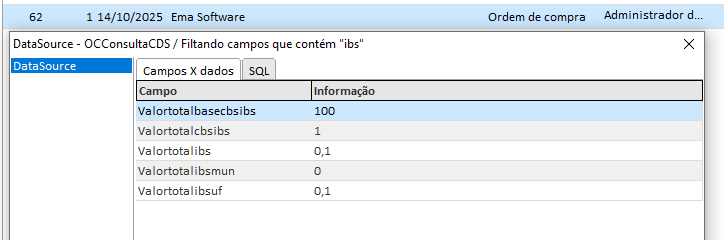
<span style="white-space: pre-wrap;">Ao consultar todos os dados da Ordem de Compra </span>`<span class="editor-theme-code">[CTRL + SHIFT + D]</span>`, os seguintes campos estarão disponíveis:

- `<span class="editor-theme-code">VALORTOTALBASECBSIBS</span>`
- `<span class="editor-theme-code">VALORTOTALCBSIBS</span>`
- `<span class="editor-theme-code">VALORTOTALIBS</span>`
- `<span class="editor-theme-code">VALORTOTALIBSMUN</span>`
- `<span class="editor-theme-code">VALORTOTALIBSUF</span>`
- `<span class="editor-theme-code">VALORTOTALCBS</span>`

[![image.png](https://kb.emasistemas.com.br/uploads/images/gallery/2025-10/scaled-1680-/IHhf8f0WIfWHL5uC-image.png)](https://kb.emasistemas.com.br/uploads/images/gallery/2025-10/IHhf8f0WIfWHL5uC-image.png)

##### Consulta Banco de Dados

É possível consultar diretamente no Banco de Dados utilizando os comandos abaixo:

```
SELECT IDTRIBUTO, 
       IDSITUACAO,
       IDCLASSTRIB,
       CSTCBSIBS, 
       CLASSTRIBCBSIBS, 
       PERCCBS,
       PERCIBSMUN, 
       PERCIBSUF,
       PERCREDUCAOCBS, 
       PERCREDUCAOIBSUF,
       PERCREDUCAOIBSMUN, 
       VALORBASECBSIBS, 
       VALORCBS,
       VALORIBSUF, 
       VALORIBSMUN, 
       VALORIBS, 
       PERCEFETIBSMUN, 
       PERCEFETIBSUF, 
       PERCEFETCBS, 
       VALORCBSIBS
  FROM OC_ITEM 
 WHERE IDOC = 62
```

```
SELECT VALORTOTALBASECBSIBS,
       VALORTOTALCBS,
       VALORTOTALIBSUF,
       VALORTOTALIBSMUN,
       VALORTOTALIBS,
       VALORTOTALCBSIBS
  FROM OC
 WHERE IDOC = 62
```

##### Observações / Boas práticas

- <span style="white-space: pre-wrap;">Os campos da Reforma Tributária são gravados no Banco de Dados, mas </span>**não são exibidos na interface da Ordem de Compra**.
- <span style="white-space: pre-wrap;">Ao faturar a Ordem de Compra, essas informações são automaticamente levadas para a </span>**Nota Fiscal de Entrada**.
- Garantir que os itens estejam previamente configurados com os tributos da Reforma Tributária, conforme o cadastro de NCM.

#### **Pedidos**

<span style="white-space: pre-wrap;">A operação de Pedidos permanece inalterada para o usuário final. No entanto, ao incluir itens com configurações de </span>**Impostos da Reforma Tributária**, as novas informações são gravadas automaticamente no Banco de Dados. Essas informações serão posteriormente utilizadas no faturamento e emissão da Nota Fiscal de Saída.

**📂 Caminhos de Acesso**

**Ema ERP / Ema ERPx:**  
`<span class="editor-theme-code">Vendas > Operações > Criar Pedido</span>`

##### Passo a Passo da Operação

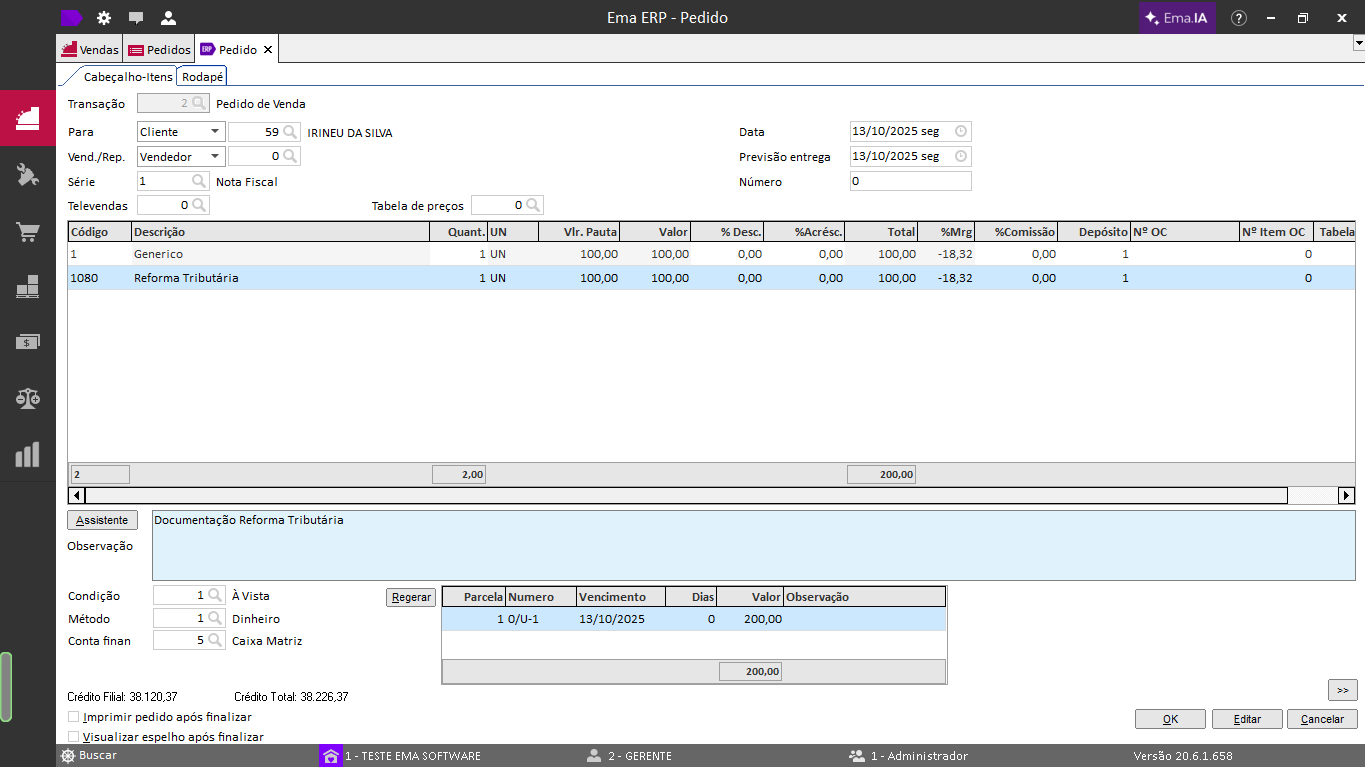
> **Exemplo:**<span style="white-space: pre-wrap;"> Pedido com 2 itens, sendo</span> **um com configuração da Reforma Tributária:**
> 
> 1. Criar um novo Pedido com os itens desejados.
> 2. Informar os itens normalmente, sem necessidade de campos adicionais para a Reforma Tributária.
> 3. Salvar o Pedido.

<table class="align-center" id="bkmrk-c%C3%B3digodescri%C3%A7%C3%A3oconfi-3" style="box-sizing: border-box; outline-color: rgb(41, 44, 63); outline-width: 1px; margin: 0.3em auto 1.375em; padding: 0px; border: 0px; font: inherit; vertical-align: baseline; border-collapse: collapse; border-spacing: 0px; min-width: 100px; max-width: 100%; hyphens: auto; table-layout: fixed; text-align: center;"><colgroup><col></col><col></col><col></col></colgroup><tbody><tr style="box-sizing: border-box; outline-color: rgb(41, 44, 63); outline-width: 1px; margin: 0px; padding: 0px; border: 0px; font: inherit; vertical-align: baseline;"><th style="box-sizing: border-box; outline-color: rgb(41, 44, 63); outline-width: 1px; margin: 0px; padding: 6px 8px; border: 1px solid rgb(221, 221, 221); font-style: inherit; font-variant: inherit; font-weight: inherit; font-stretch: inherit; font-size: inherit; line-height: 1.2; font-family: inherit; font-optical-sizing: inherit; font-size-adjust: inherit; font-kerning: inherit; font-feature-settings: inherit; font-variation-settings: inherit; vertical-align: top; min-width: 10px; overflow: auto; word-break: break-word;">**Código**

</th><th style="box-sizing: border-box; outline-color: rgb(41, 44, 63); outline-width: 1px; margin: 0px; padding: 6px 8px; border: 1px solid rgb(221, 221, 221); font-style: inherit; font-variant: inherit; font-weight: inherit; font-stretch: inherit; font-size: inherit; line-height: 1.2; font-family: inherit; font-optical-sizing: inherit; font-size-adjust: inherit; font-kerning: inherit; font-feature-settings: inherit; font-variation-settings: inherit; vertical-align: top; min-width: 10px; overflow: auto; word-break: break-word;">**Descrição**

</th><th style="box-sizing: border-box; outline-color: rgb(41, 44, 63); outline-width: 1px; margin: 0px; padding: 6px 8px; border: 1px solid rgb(221, 221, 221); font-style: inherit; font-variant: inherit; font-weight: inherit; font-stretch: inherit; font-size: inherit; line-height: 1.2; font-family: inherit; font-optical-sizing: inherit; font-size-adjust: inherit; font-kerning: inherit; font-feature-settings: inherit; font-variation-settings: inherit; vertical-align: top; min-width: 10px; overflow: auto; word-break: break-word;">**Config. Reforma Tributária?**

</th></tr><tr style="box-sizing: border-box; outline-color: rgb(41, 44, 63); outline-width: 1px; margin: 0px; padding: 0px; border: 0px; font: inherit; vertical-align: baseline;"><td style="box-sizing: border-box; outline-color: rgb(41, 44, 63); outline-width: 1px; margin: 0px; padding: 6px 8px; border: 1px solid rgb(221, 221, 221); font-style: inherit; font-variant: inherit; font-weight: inherit; font-stretch: inherit; font-size: inherit; line-height: 1.2; font-family: inherit; font-optical-sizing: inherit; font-size-adjust: inherit; font-kerning: inherit; font-feature-settings: inherit; font-variation-settings: inherit; vertical-align: top; min-width: 10px; overflow: auto; word-break: break-word;">1

</td><td style="box-sizing: border-box; outline-color: rgb(41, 44, 63); outline-width: 1px; margin: 0px; padding: 6px 8px; border: 1px solid rgb(221, 221, 221); font-style: inherit; font-variant: inherit; font-weight: inherit; font-stretch: inherit; font-size: inherit; line-height: 1.2; font-family: inherit; font-optical-sizing: inherit; font-size-adjust: inherit; font-kerning: inherit; font-feature-settings: inherit; font-variation-settings: inherit; vertical-align: top; min-width: 10px; overflow: auto; word-break: break-word;">Genérico

</td><td style="box-sizing: border-box; outline-color: rgb(41, 44, 63); outline-width: 1px; margin: 0px; padding: 6px 8px; border: 1px solid rgb(221, 221, 221); font-style: inherit; font-variant: inherit; font-weight: inherit; font-stretch: inherit; font-size: inherit; line-height: 1.2; font-family: inherit; font-optical-sizing: inherit; font-size-adjust: inherit; font-kerning: inherit; font-feature-settings: inherit; font-variation-settings: inherit; vertical-align: top; min-width: 10px; overflow: auto; word-break: break-word;">Não

</td></tr><tr style="box-sizing: border-box; outline-color: rgb(41, 44, 63); outline-width: 1px; margin: 0px; padding: 0px; border: 0px; font: inherit; vertical-align: baseline;"><td style="box-sizing: border-box; outline-color: rgb(41, 44, 63); outline-width: 1px; margin: 0px; padding: 6px 8px; border: 1px solid rgb(221, 221, 221); font-style: inherit; font-variant: inherit; font-weight: inherit; font-stretch: inherit; font-size: inherit; line-height: 1.2; font-family: inherit; font-optical-sizing: inherit; font-size-adjust: inherit; font-kerning: inherit; font-feature-settings: inherit; font-variation-settings: inherit; vertical-align: top; min-width: 10px; overflow: auto; word-break: break-word;">1080

</td><td class="align-center" style="box-sizing: border-box; outline-color: rgb(41, 44, 63); outline-width: 1px; margin: 0px; padding: 6px 8px; border: 1px solid rgb(221, 221, 221); font-style: inherit; font-variant: inherit; font-weight: inherit; font-stretch: inherit; font-size: inherit; line-height: 1.2; font-family: inherit; font-optical-sizing: inherit; font-size-adjust: inherit; font-kerning: inherit; font-feature-settings: inherit; font-variation-settings: inherit; vertical-align: top; min-width: 10px; overflow: auto; word-break: break-word; text-align: center;">Reforma Tributária

</td><td class="align-center" style="box-sizing: border-box; outline-color: rgb(41, 44, 63); outline-width: 1px; margin: 0px; padding: 6px 8px; border: 1px solid rgb(221, 221, 221); font-style: inherit; font-variant: inherit; font-weight: inherit; font-stretch: inherit; font-size: inherit; line-height: 1.2; font-family: inherit; font-optical-sizing: inherit; font-size-adjust: inherit; font-kerning: inherit; font-feature-settings: inherit; font-variation-settings: inherit; vertical-align: top; min-width: 10px; overflow: auto; word-break: break-word; text-align: center;">Sim

</td></tr></tbody></table>

[![image.png](https://kb.emasistemas.com.br/uploads/images/gallery/2025-10/scaled-1680-/CXA4eDX23lomkgXb-image.png)](https://kb.emasistemas.com.br/uploads/images/gallery/2025-10/CXA4eDX23lomkgXb-image.png)

##### Resultados Esperados

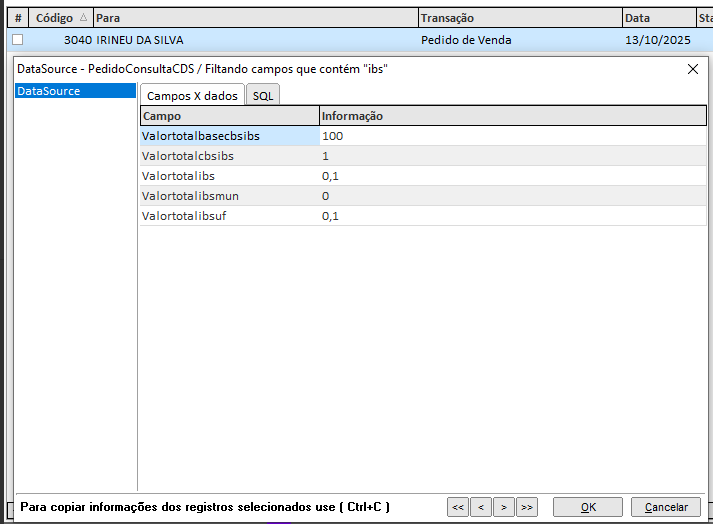
<span style="white-space: pre-wrap;">Ao consultar todos os dados do Pedido </span>`<span class="editor-theme-code">[CTRL + SHIFT + D]</span>`, os seguintes campos estarão disponíveis:

- `<span class="editor-theme-code">VALORTOTALBASECBSIBS</span>`
- `<span class="editor-theme-code">VALORTOTALCBSIBS</span>`
- `<span class="editor-theme-code">VALORTOTALIBS</span>`
- `<span class="editor-theme-code">VALORTOTALIBSMUN</span>`
- `<span class="editor-theme-code">VALORTOTALIBSUF</span>`
- `<span class="editor-theme-code">VALORTOTALCBS</span>`

[![image.png](https://kb.emasistemas.com.br/uploads/images/gallery/2025-10/scaled-1680-/egzEDwXsZhdYIY3u-image.png)](https://kb.emasistemas.com.br/uploads/images/gallery/2025-10/egzEDwXsZhdYIY3u-image.png)

#####   


##### Consulta Banco de Dados

É possível consultar diretamente no Banco de Dados utilizando os comandos abaixo:

```
SELECT IDTRIBUTO, 
       IDSITUACAO,
       IDCLASSTRIB,
       CSTCBSIBS, 
       CLASSTRIBCBSIBS, 
       PERCCBS,
       PERCIBSMUN, 
       PERCIBSUF,
       PERCREDUCAOCBS, 
       PERCREDUCAOIBSUF,
       PERCREDUCAOIBSMUN, 
       VALORBASECBSIBS, 
       VALORCBS,
       VALORIBSUF, 
       VALORIBSMUN, 
       VALORIBS, 
       PERCEFETIBSMUN, 
       PERCEFETIBSUF, 
       PERCEFETCBS, 
       VALORCBSIBS
  FROM PEDIDO_ITEM 
 WHERE IDPEDIDO = 3040
```

```
SELECT VALORTOTALBASECBSIBS,
       VALORTOTALCBS,
       VALORTOTALIBSUF,
       VALORTOTALIBSMUN,
       VALORTOTALIBS,
       VALORTOTALCBSIBS
  FROM PEDIDO
 WHERE IDPEDIDO = 3040
```

##### Configuração da Nota fiscal de Serviço eletrônica com a reforma tributária

Além das alterações para a emissão da nota de mercadorias, temos também algumas alterações para a emissão da nota fiscal de serviço, vamos mostrar abaixo as informações necessárias que devem ser habilitadas:

**Parâmetro Geral de vendas**

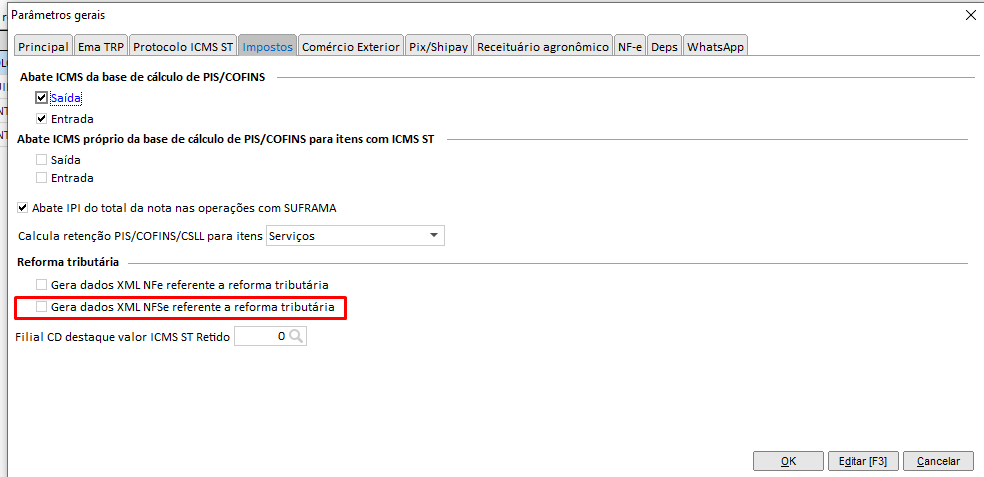
Devemos habilitar o parâmetro abaixo da reforma tributária da NF-e para utilizar o novo recurso da reforma tributária para a NFS-e

<span style="white-space: pre-wrap;"> </span>**Caminho de acesso:**  
`<span class="editor-theme-code">Ema ERP > Configuração > Cadastros > Matriz/Filial > Ações > Outros parâmetros > Aba: Impostos</span>`

> <span style="white-space: pre-wrap;">Parâmetro que deve ser habilitado: </span>**Gera dados XML NFSe referente a reforma tributária**

[![image.png](https://kb.emasistemas.com.br/uploads/images/gallery/2026-01/scaled-1680-/5B0Ve8bZOFuq6Dng-image.png)](https://kb.emasistemas.com.br/uploads/images/gallery/2026-01/5B0Ve8bZOFuq6Dng-image.png)
**Configuração do NBS para emissão de notas fiscais de serviço**

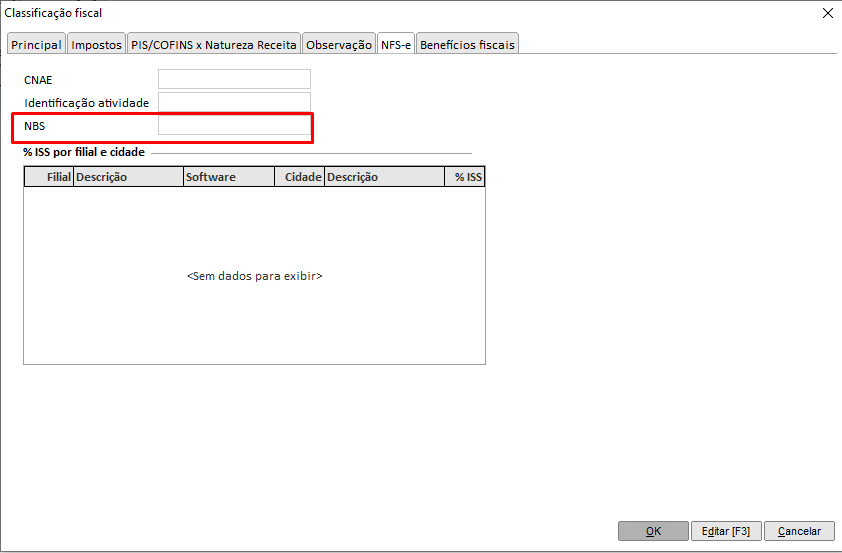
<span style="white-space: pre-wrap;">Também relacionado à </span>**Reforma Tributária**<span style="white-space: pre-wrap;">, o cadastro de </span>**Classificações Fiscais (NCM)**<span style="white-space: pre-wrap;"> foi inserido um novo campo para contemplar a informação do </span>**NBS**<span style="white-space: pre-wrap;"> (Nomenclatura brasileira de serviços), para isso vamos até a aba </span>**NFSe** da classificação fiscal para preenchermos:

<span style="white-space: pre-wrap;">📂 </span>**Caminhos de acesso:**

- **Ema ERP:**  
    `<span class="editor-theme-code">Estoque > Cadastros > Classificações Fiscais (NCM) > Aba NFSe</span>`
- **Ema ERPx:**  
    `<span class="editor-theme-code">Estoque > Cadastros > Classificações Fiscais (NCM) > Aba NFSe</span>`

[![image.png](https://kb.emasistemas.com.br/uploads/images/gallery/2026-01/scaled-1680-/uDBkYpR1nffuPtx5-image.png)](https://kb.emasistemas.com.br/uploads/images/gallery/2026-01/uDBkYpR1nffuPtx5-image.png)

##### Observações / Boas práticas

- <span style="white-space: pre-wrap;">Os campos da Reforma Tributária são gravados no Banco de Dados, mas </span>**não são exibidos na interface do pedido**.
- <span style="white-space: pre-wrap;">Ao faturar o pedido, essas informações são automaticamente levadas para a </span>**Nota Fiscal de Saída**.
- Garantir que os itens estejam previamente configurados com os tributos da Reforma Tributária, conforme o cadastro de NCM.